User Manual
File Server
Before you can exchange files you have to register a user. After that you can exchange files with the registered users.
The File Server uses SSL clientAuthentication, so the user must authenticate itself using an SSL certificate and the File Server must trust this certificate. The clientCertificate is registered with the user on the File Server and will be used to authenticate the user when up- or downloading a file.
See here for the OpenAPI Spec.
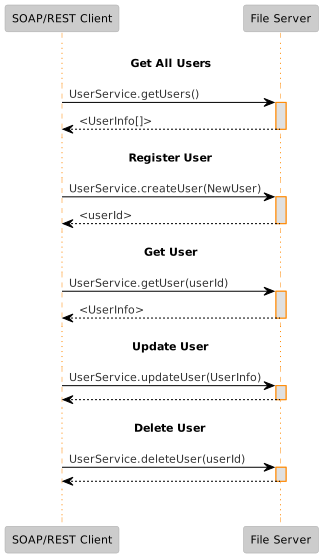
Manage Users
You can manage users using the REST and SOAP UserService.
Exchange Files
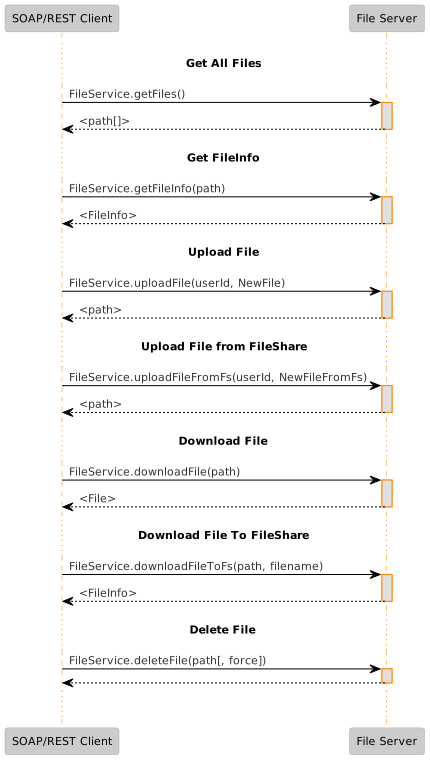
The File Server can exchange files with registered users using the REST and SOAP FileService.
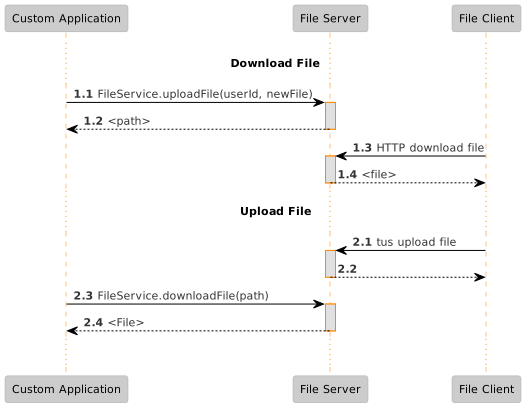
File download

- upload the
filefor the registered useruserIdto theFile Serverand receive thepathto the download file
Note: alternatively use the actionuploadFileFromFsif you use a FileShare to transfer files - Optional: download the
external-data-referencefor Grote Berichten file transfer
Note: Theexternal-data-referencecontains the full download url to the file - after the url is communicated, the user can download the file from the File Server using a client. The user can use a browser using the path and with its SSL keystore installed in the browser. The user can also use another HTTP download tool such as curl or wget or the File Client to download the file
- delete the
file
File upload

- the
Clientuploads thefileto theFile Serverusing a tus client - after the url is communicated, download the
filefrompath
Note: alternatively use the actiondownloadFileFromFsif you use a FileShare to transfer files - proces the
file - delete the
file
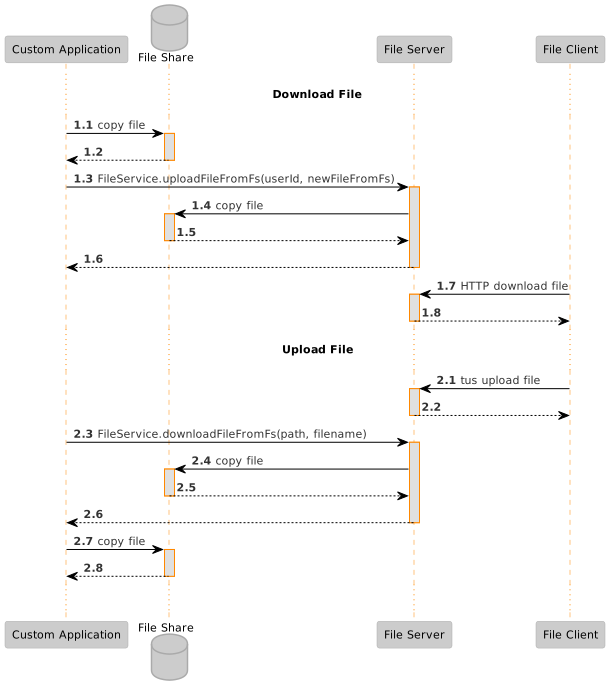
Exchange Files via FileShare
Files can also be exchanged with the File Server via a FileShare:
Manage Files
You can manage files using the REST and SOAP FileService.
File Client
See here for the OpenAPI Spec.
Exchange Files
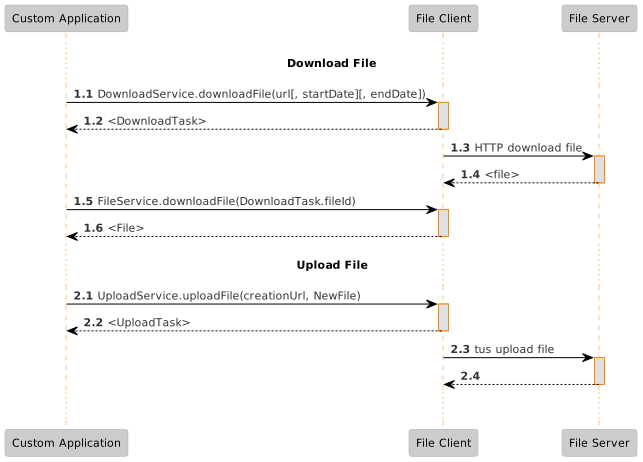
The File Client can exchange files using the download and upload REST and SOAP interfaces.
File download
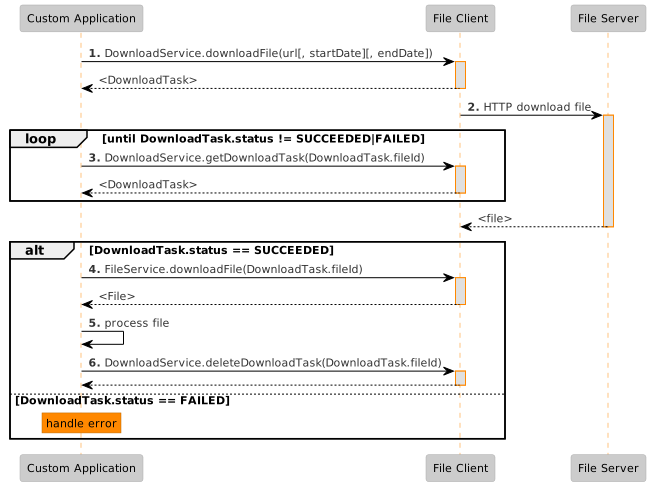
- create a
DownloadTaskto downloadurl - the
File Clientwill start to download thefile - the application checks the
statusof theDownloadTask - if the status ==
SUCCEEDEDthen download theFile - process the
file - delete the
DownloadTask
File upload
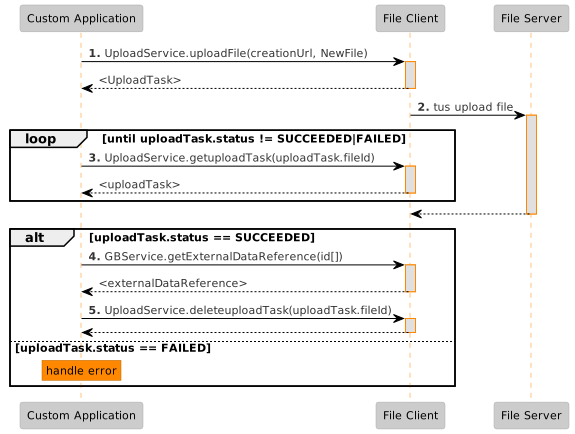
- create a
UploadTaskto uploadNewFiletocreationUrl - the
File Clientwill start to upload thefile - the application checks the
statusof theUploadTask - if the status ==
SUCCEEDEDthen Optional: download theexternal-data-referencefor Grote Berichten file transfer
Note: Theexternal-data-referencecontains the full download url to the file - delete the
UploadTask
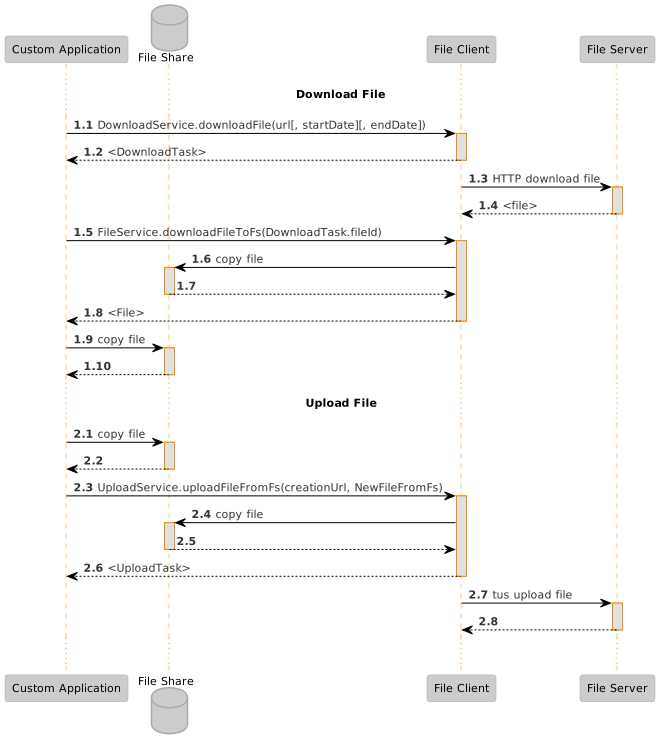
Exchange Files via FileShare
Files can also be exchanged with the ClientServer via a FileShare:
Manage Files
You can manage files using the REST and SOAP FileService.
Manage DownloadTasks
You can manage DownloadTasks using the REST and SOAP DownloadService.

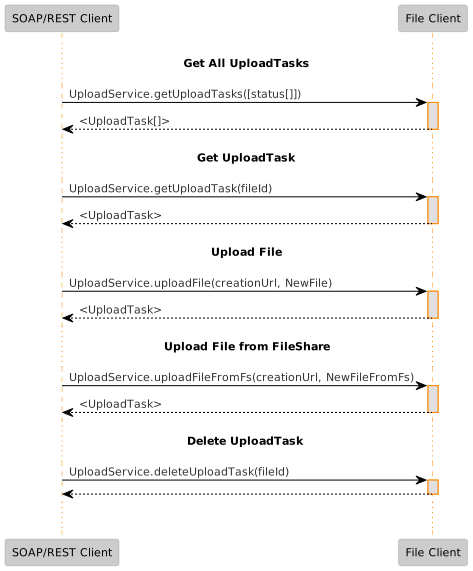
Manage UploadTasks
You can manage UploadTasks using the REST and SOAP UploadService.