Introduction
File Server
The File Server is developed to exchange files with other parties in a safe and reliable way. Clients can upload files to the File Server using the tus protocol and can download files from the File Server using the HTTP protocol. Both upload and download are resumable. The File Server uses SSL client certificates to authenticate a client. You can use the File Client to exchange files with the File Server, but you can also use a tus client to upload files to the File Server and a HTTP client to download files from the File Server.
The File Server stores client and file data in the database and the files on the filesystem.
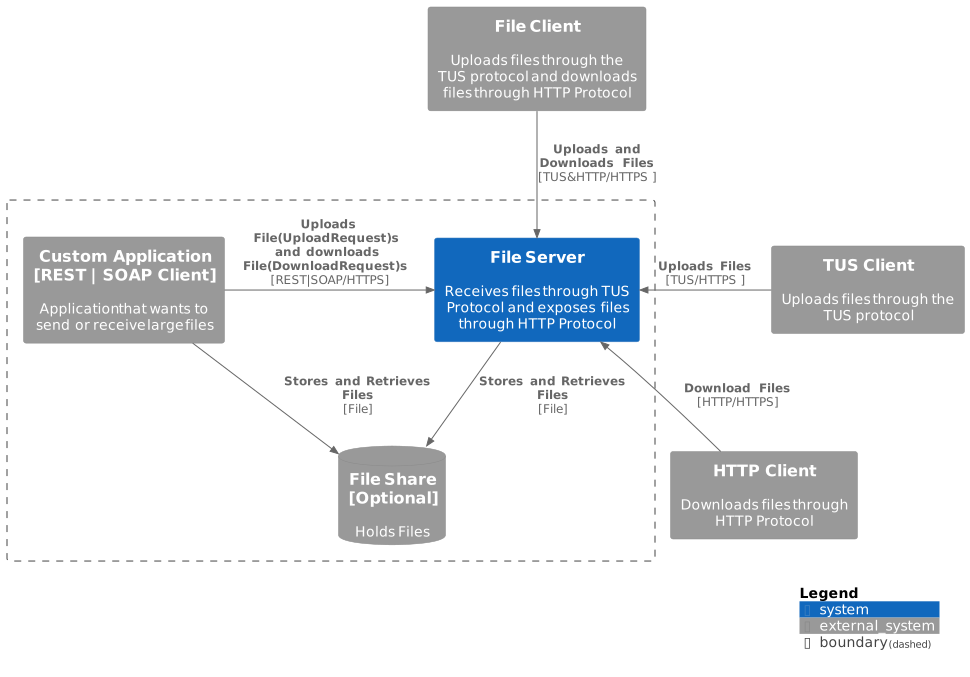
The File Server offers a REST and a SOAP interface. Applications can exchange files with the File Server through these interfaces directly or use a File Share instead.
Before the File Server can exchange files with a client, the client has to be registered with the File Server using its SSL client certificate.
The File Server can be used for Grote Berichten file transfer.
You can find the Installation and Configuration Guide for the File Server here. The User Manual describes how to configure users and exchange files. Here you can find an example how to exchange files between the File Server and File Client using the default configuration. There is also a Docker example available.
File Client
The File Client can be used to exchange files with the File Server.
The File Client stores file data in the database and the files on the filesystem.
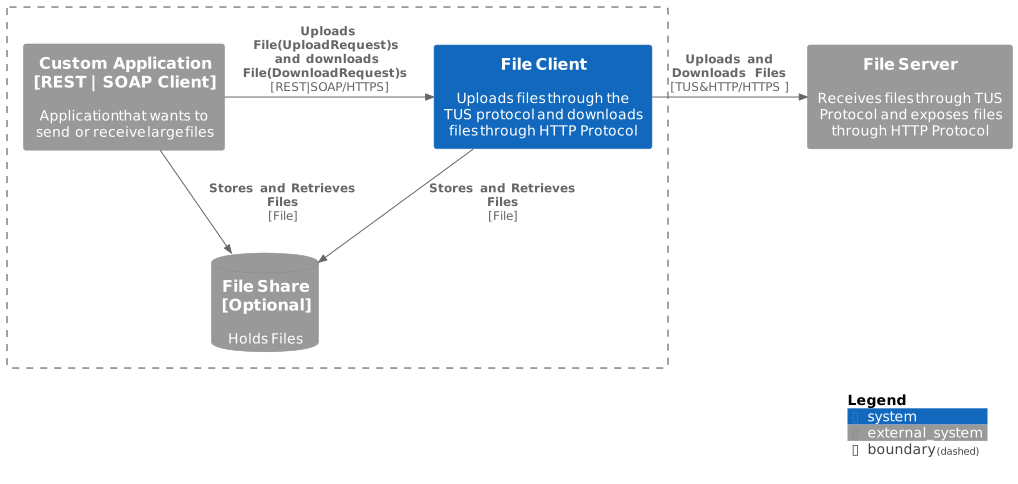
The File Client also offers a REST and SOAP interface. Applications can exchange files with the File Client through these interfaces directly or use a File Share instead.
Before the File Client can exchange files with the File Server, the File Client has to be registered with the File Server using the clients' SSL client certificates.
The File Client can also be used for Grote Berichten file transfer.
You can find the Installation and Configuration Guide for the File Client here. The User Manual describes how to configure users and exchange files. Here you can find an example how to exchange files between the File Server and File Client using the default configuration. There is also a Docker example available.